Morphology Analysis Concepts
This topic provides an overview of concepts important to Morphology Analysis in Image Studio.
Concepts
- Morphological Analysis
-
Morphological analysis refers to image processing and analysis techniques used to measure geometric properties of shapes in an image.
Measuring the area of a spheroid in an image is an example of morphological analysis.
- Mask
-
Filter used to designate regions used by morphology processes to identify shapes.
The mask in Image Studio morphological analysis can be created from manually set pixel intensity thresholds (upper and lower) or from automatically determined pixel intensity thresholds (upper and lower). The mask created by the manually set pixel intensity thresholds is visible as gray pixels that overlay regions of interest (i.e., regions that fall within the upper and lower thresholds) on the image being analyzed. The mask generated by Auto Detection is not displayed over the image.
- Dilation
-
In general, dilation is a processing step used to increase the size and solidity of shapes in an image analysis.
Dilation works by comparing the intensity value for each pixel location in an image with other pixels in its "neighborhood" and setting the intensity of that pixel location in the output image to the maximum pixel value in the neighborhood. The neighborhood is defined by a matrix known as a structuring element.
When used in Image Studio Morphology Analysis, dilation is performed on the image mask as part of Threshold Shapes process or Refine Shapes process. When parameters are set such that dilation will be performed as part of Threshold Shapes or Refine Shapes, the shapes identified can be changed due to the dilation process, but the original image is not modified.
Dilation is the opposite of erosion.
- Erosion
-
In general, erosion is a processing step used to remove insubstantial shapes, smooth jagged edges, remove small joins between shapes, and to leave only shapes that are meaningful to the image analysis.
Erosion works by comparing the intensity value for each pixel location in an image with other pixels in its "neighborhood" and setting the intensity of that pixel location in the output image to the minimum pixel value in the neighborhood. The neighborhood is defined by a matrix known as a structuring element.
When used in Image Studio Morphology Analysis, erosion is performed on the image mask as part of Threshold Shapes process or Refine Shapes process. When parameters are set such that dilation will be performed as part of Threshold Shapes or Refine Shapes, the shapes identified can be changed due to the erosion process, but the original image is not modified.
Erosion is the opposite of dilation.
- Structuring Element
-
The structuring element is a matrix used to define the pixel neighborhood used for erosion and dilation.
During erosion and dilation, the structuring element is scanned pixel by pixel over the entire image. During the scan, each pixel will be evaluated against the pixels in its neighborhood. The neighborhood is defined by the dimensions of the structuring element.
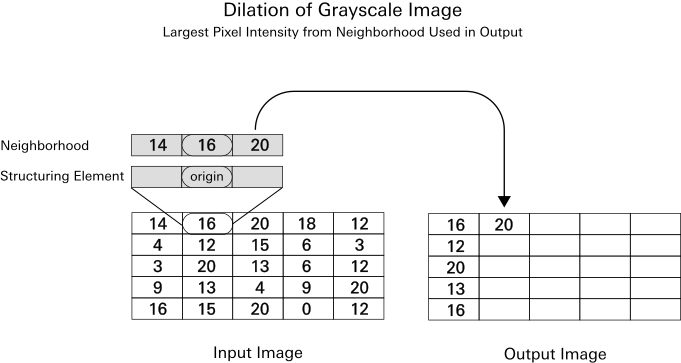
Illustration showing how a structuring element is used in the dilation process. In the erosion process, the smallest pixel from the neighborhood (defined by the structuring element) is used instead of the largest pixel intensity. - Opening
-
In general, opening means to perform erosion and then dilation. The intent of opening is to make the erosion and dilation refinements, while generally preserving object size.
When used in Image Studio Morphology Analysis, opening is performed on the image mask. The original image is not modified.
- Closing
-
In general, closing means to perform dilation and then erosion. The intent of opening is to make the dilation and erosion refinements, while generally preserving object size.
When used in Image Studio Morphology Analysis, closing is performed on the image mask. The original image is not modified.