System Overview
Scan Surface and Lid
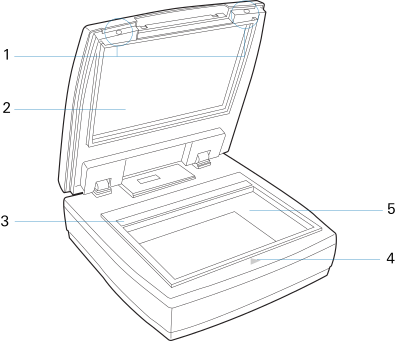
View with the lid raised and the scan surface exposed.
| Part Name | Description | |
| 1 | Holes (2) | Used to attach the Viewing Shield when performing a gel observation or band excision |
| 2 | Scanner Lid | The top cover of the scanner |
| 3 | Calibration Window | The scanner uses the calibration window to make automatic calibrations during scanning. |
| 4 | Alignment Arrow | Used to align gels on the scan surface |
| 5 | Scan Surface | Place the gel here for scanning, excision, or observation |
Rear Panel
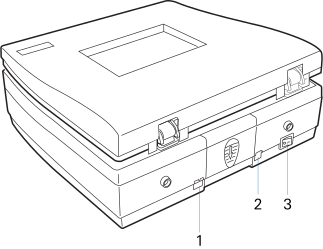
| Part Name | Description | |
| 1 | Hi-Speed USB Port | Connects the Hi-Speed USB (USB 2.0) cable to the computer. |
| 2 | Power Connector | Connects the scanner to the power adapter. |
| 3 | Power Switch | Turns the scanner on or off. |